Advertisements
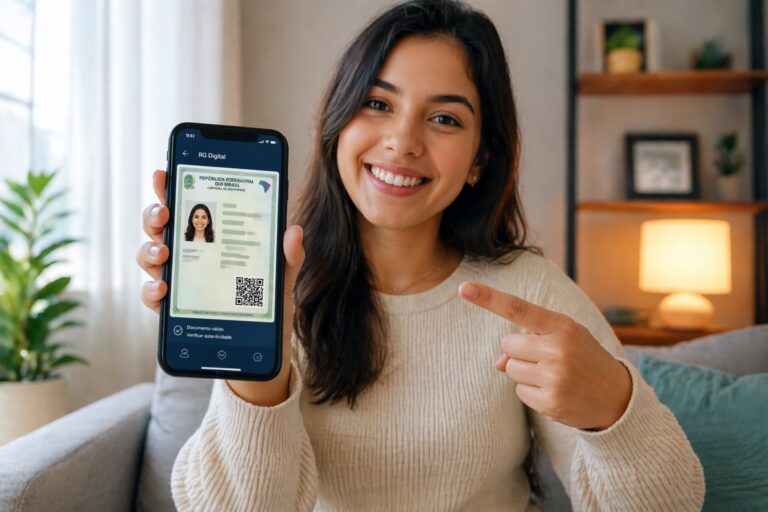
The digitization of documents in Brazil is transforming how citizens access public services and prove their identity. Among these innovations, the Digital ID stands out for offering practicality, security, and speed in daily life, eliminating the need to constantly carry the physical document.
With the advancement of technology and the integration of government systems, the Digital ID Card (RG Digital) has become accepted in various situations, from identification in establishments to more formal processes. However, many people still have doubts about how to download and use this digital version correctly.
If you want to understand exactly how to obtain a Digital ID, avoid common mistakes, and take advantage of all the benefits of this tool, this complete guide will walk you through it simply and directly until the end.
What is the Digital ID and how does it work?
The Digital ID is the electronic version of the traditional identity card, available directly on your cell phone. It has the same legal validity as the physical document, provided it is issued by official bodies and accessed through authorized applications.
Advertisements
The main difference lies in the presentation format. Instead of paper or plastic, the document is stored digitally and protected by security mechanisms such as biometrics, passwords, and QR codes for validation.
Furthermore, the Digital ID is part of a larger digital transformation movement in Brazil, which seeks to make public services more accessible, faster, and safer for the entire population.
Step-by-step guide to downloading the Digital ID.
Now that you understand the requirements, let's go through the complete process to download the Digital ID to your cell phone.
1. Check if your ID card has a QR code.
First of all, check if your physical document has a QR code. It's usually located on the back of the ID card or on one of the sides.
If there is no QR code, you will need to request an updated duplicate of the document.
2. Download the official app
Access your mobile phone's app store (Google Play or App Store) and search for the app indicated for your state or for Gov.br.
Make sure the app is official by checking the developer and reviews.
3. Create or access your account
When you open the app, you will need to log in. If you don't already have an account, you will need to create one using your personal information.
In the case of Gov.br, registration may require validation via facial recognition or bank details to increase the level of security.
4. Scan the QR Code on your ID card.
Within the app, there will be an option to add the document. At that point, you will need to use your phone's camera to scan the QR code on your physical ID card.
This step is crucial to validate the authenticity of the document.
5. Perform identity verification.
Depending on the app, you may need to confirm your identity through a selfie, biometrics, or other forms of authentication.
This step ensures that only the owner has access to the digital document.
6. Finalize and access your Digital ID.
After validation, the Digital ID will be available in the app. From then on, you can access it whenever you need to, even offline in some cases.
Who can download the Digital ID in Brazil?
Before starting the process, it's important to understand that not all ID cards allow for a digital version automatically. In general, you need to meet some basic requirements.
Having an ID card with a QR code
To download the Digital ID, your physical document needs to be recent and contain a printed QR Code. This code is essential to validate the document's authenticity in the app.
If your ID card is old and does not have a QR code, you will need to request a new one from a responsible agency, such as the Identification Institute of your state.
Being in a state that offers the service
The Digital ID card (RG Digital) still depends on implementation by Brazilian states. Although most already offer the service, there may be differences in the application used or the registration process.
Own a compatible smartphone
You will need a mobile phone with internet access and the ability to install official applications. Additionally, it is recommended that the device supports biometric authentication or a password for greater security.
Official apps to access the Digital ID.
In Brazil, the Digital ID card can be accessed through different apps, depending on the state or integration with national platforms.
Gov.br application
Gov.br is one of the main platforms used to access digital documents. It centralizes various public services, including identity cards, work permits, and other records.
In addition to enabling access to the Digital ID in some states, the app also offers secure authentication and integration with various government systems.
State identification applications
Some states have their own apps to provide the Digital ID. These apps are developed by local identification institutes and may have different names, such as "Digital ID SP", "Digital Document" or similar.
It is important to always download the official app recommended by the issuing agency in your state to ensure security and proper functioning.
Main mistakes when trying to download the Digital ID.
Even though it's a simple process, some errors can hinder access to the Digital ID.
Use of unofficial apps
Downloading fake or unofficial apps can prevent access to the document and put your data at risk. Always use government-recommended apps.
Old ID card without QR Code
This is one of the most common problems. Without the QR code, it's not possible to validate the document digitally.
Inconsistent data in the registration.
Discrepancies between the information on your ID card and the information registered in the app may cause validation errors.
Advantages of using the Digital ID in everyday life.
The use of the Digital ID goes far beyond practicality. It brings real benefits to different situations.
Quick access anywhere
With the document on your cell phone, you can identify yourself in seconds, without depending on the physical version.
Greater security against fraud.
The use of QR codes and digital authentication makes counterfeiting more difficult and increases the reliability of the document.
Less bureaucracy
The Digital ID card simplifies processes that previously required physical copies and in-person authentication.
Does the Digital ID replace the physical document?
Although legally valid in many situations, the Digital ID card does not yet completely replace the physical document in all contexts.
Some institutions may require a physical copy, especially in more formal processes or where the legislation has not yet been updated.
Therefore, ideally, the Digital ID should be used as a complement, not as a complete replacement.
Tips for using your Digital ID safely.
To ensure a good experience, it's important to follow some safety practices.
Activate phone lock
Use a password, biometrics, or facial recognition to protect your device.
Avoid sharing access.
Never allow other people to use your app with your personal data.
Keep the app up to date
Updates ensure improved security and functionality.
Conclusion
The Digital ID represents a significant advancement in how Brazilians handle personal documents, bringing more practicality, security, and speed to daily life. Although some limitations still exist, the trend is for more and more services to accept the digital version, making it essential. By following the step-by-step instructions correctly and using official applications, you ensure a safe and efficient experience.
FAQ – Frequently Asked Questions
1. Can I download the Digital ID without a QR Code?
No. The QR code is required to validate the document in the app.
2. Does the Digital ID work without internet access?
Yes, in many applications it can be accessed offline after downloading.
3. Is it safe to use the Digital ID?
Yes, as long as you use official apps and keep your phone protected.
4. Is the Digital ID valid as an official document?
Yes, but acceptance rates can vary depending on the institution.
5. Do I need to pay to download the Digital ID?
No. Downloading and using the Digital ID card is free.